Jan23

Google and Microsoft gadget developer setup compared

Modern web APIs embrace the self-publishing tinkerer, making integration an easy step for a variety of web publishers. A few lines of HTML and a quick copy and paste of some JavaScript might be all a publisher needs to add new functionality to their site or roll out a completely new feature. I think the most successful developer programs will offer resources for the tinkerers as well as the developers, extending their reach and developer base beyond those with a knowledge of post versus get.
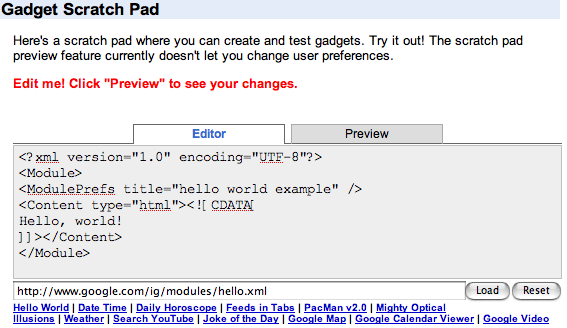
Google Gadget scratch pad

The Google Gadgets getting started guide walks would-be gadget makers through the process of creating a gadget, introducing a few choices to consider depending on their implementation. At the bottom of the page Google includes a "scratch pad," letting visitors tweak a few existing gadgets and preview the results in a separate tab view. This view source development process is a proven learning tool letting people experiment with a familiar (and functioning) page, tinkering and changing a few pieces to see what happens.

Contrast Google's process with Microsoft's competing Windows Live Gadget SDK.

Windows Live Gadget first steps

Microsoft greets potential new gadget developers with a set of web server install tips, caching configurations in Internet Explorer, and setting up Visual Studio. On first read my reaction is "I don't have that" and I walk away.

Microsoft currently lists 477 total web gadgets in its directory. Google does not display a total number but I was able to page through over 1000 homepage modules in the Google directory. Google appears to have a big lead in gadget implementations and it's easy to see why.

Summary

Identifying your audience and knocking down any barriers to entry should help accelerate any developer network. I believe the API implementer can be an eager amateur as well as an experienced developer, and companies trying to extend their reach should embrace both the tweakers and the coders.

How do you sell your API? Help your visitors visualize the end result as they attempt to gauge the amount of work and expertise needed to implement. The first step is letting the potential customer try customizing your product and visualize their own use before they personally dive in deeper or hire an integrator. Keep it simple.

4 Comments

Commentary on "Google and Microsoft gadget developer setup compared":

Subscribe to new comments

  1. Dominic Jones on January 23, 2007 at 3:54 PM wrote: #

    There are many more tweakers than coders today, thanks to the MySpace/blogs phenomenon. So a little usability can go a long way to easing adoption and use. Great example.
  2. Venkk on January 26, 2007 at 7:57 PM wrote: #

    I implemented a Google Gadget called Clickables and my decision to go for Google Gadget was the need for friends network acess in my gadget. I found Google Gadget provided GTalk API integration and Windows Messenger API provided limited access that too within their Messenger environment.

    A wider range of API services will also help grow developer network allowing end-users see more possibilities thereby driving increased innovation.

  3. Scott on January 30, 2007 at 3:27 PM wrote: #

    Would it be reasonable to compare both of them to Apples Dashcode IDE? Or would that be comparing Apples to Oranges (har har) since Dashboard widgets can only run on the OS X dashboard?
  4. Niall Kennedy on January 30, 2007 at 4:07 PM wrote: #

    Scott

    Apple Dashcode and the Google Desktop Gadget Designer are desktop applications targeting a specific widget deployment and its unique features.

    Dashcode is a useful development tool for shared technologies such as XML, CSS, and JavaScript and could assist in the development of web gadgets. Dashcode's included templates will help widget creators tweak a few settings and publish their own widget.

    Specialized development applications (either online or in the browser) are definitely one way to help developers create new widgets, simplifying common tasks such as inputting author data, creating a default screenshot for your widget, or even profiling browser compatibility. I expect each major web widget maker will have a compliance test suite available for developers, either through an online validator or a desktop environment.

Add a comment

Some comments may be placed in a moderation queue to ensure topical relevancy. You may contact author Niall Kennedy directly if you prefer to comment privately.


(not published)


Niall Kennedy Niall Kennedy is a web technologist in San Francisco, California in the United States. I am very interested in the world of... MORE »

Search this weblog:

Subscribe:

Recently Popular

Archives: Popular Categories