Recently in Video Category

Creating and indexing online video content.

  1. Jul06

    The many flavors of H.264 video

    H.264 is not a single video codec; it is a family of codecs with some shared shortcuts grouped into 17 sets of profiles and 16 levels of constraints. Video creators and playback software share a mutual understanding of these shortcuts, which are often accelerated by specialized chipsets. This post examines a few of the many flavors of H.264 video and their application in mobile, desktop, and Flash Player environments.

    Theora 1.1 macroblocks example

    A compressed video is a series of shortcuts shared between a video creator and a viewer. A series of pictures, 30 pictures per second in most capture devices, are analyzed and compared, collapsing a group of pictures into a single photograph and variances between pictures before or after its place in the series. All lossy video codecs examine a series of pictures and look for pieces that can be thrown out and replaced with shortcuts to recreate video quality with less stored data. Specialized decoders in our playback software, often assisted by chips especially programmed to quickly execute these shortcuts, decompress video with these specialized instruction sets. Shortcuts can be patented, leading to some of the intellectual property concerns around H.264, VP8, and Theora video as video playback, and encoding targets, are increasingly integrated with web browsers implementing support for native HTML5 <video>.

    1. H.264 flavors
    2. The Apple effect
    3. Flash Player for mobile
    4. WebM and VP8
    5. Summary

    H.264 flavors

    H.264 is not a single video codec; it is a family of codecs with some shared shortcuts grouped into 17 sets of profiles and 16 levels of constraints. Decoding software, often backed by chips specially wired for video tasks (such as NVIDIA's PureVideo) fill a storage buffer and try to compute video frames more quickly than those frames are requested from the player. High-complexity profiles and levels offer the highest quality video in the smallest file size but require a larger file buffer and computational horsepower to quickly decompress a video. High complexity works well in an overpowered desktop environment but videos must be adjusted for simplified, battery sipping use cases such as a mobile phone.

    Feature Baseline
    (iPod)
    Main
    (iPad)
    High
    (MacBook)
    Flexible macroblock ordering (FMO)
    Arbitrary slice ordering (ASO)
    Redundant slices (RS)
    B slices
    Interlaced coding (PicAFF, MBAFF)
    CABAC entropy coding
    8×8 vs. 4×4 transform adaptivity
    Quantization scaling matrices
    Separate Cb and Cr QP control
    Monochrome (4:0:0)

    Videos are encoded with specific playback targets in mind based on maximum compatibility. The iPhone 3GS supports H.264 Baseline Level 3.0. The iPhone 4 and iPad support H.264 Main Profile Level 3.1. The latest netbooks with NVIDIA ION and PureVideo HD support H.264 High Profile Level 4.1. A video optimized for desktop, notebook, or netbook playback encoded using H.264 High Level 4.1 will not playback on an iPhone.

    The Apple effect

    Adobe has repeatedly said that Apple mobile devices cannot access "the full web" because 75% of video on the web is in Flash. What they don't say is that almost all this video is also available in a more modern format, H.264, and viewable on iPhones, iPods and iPads.

    Steve Jobs, April 2010

    Adobe's Flash Player added support for H.264 video decoding in August 2007 with its Flash Player 9 Update 3 Beta 2 (9.0.115) release. Websites previously included a video file, a Flash video container (FLV) with a On2 VP6 or Sorenson video track, into a single Flash file for distribution and playback. The launch of H.264 support in Flash decoupled the video player and the video file, loading videos over the network when a viewer initiates playback (a much lighter payload for embeds such as YouTube). Video websites can directly expose MP4 downloads to iTunes, the QuickTime browser plugin, or search engines for download and indexing.

    Decoupling the Flash video viewer from the underlying video provides direct access but does not necessarily deliver video "viewable on iPhones, iPods and iPads." Video publishers need to dumb down their video for Apple's low-power devices (and Flash mobile), or a video will be viewable but not playable.

    YouTube exposes multiple video resolutions on its website. Each video resolution uses a slightly different version of H.264 but none of these videos delivered to desktop web browsers are compatible with an iPhone 3GS and its Baseline profile requirement. Let's take a look at the underlying videos exposed in the default Flash version of YouTube for the latest weekly address from the White House.

    Exposed YouTube web formats

    720p
    MP4, High profile level 4.1
    480p
    FLV, Main profile level 3.1
    360p
    FLV, Main profile level 3.0

    The H.264 videos used by YouTube for default video playback on web browsers are not compatible with portable Apple devices not built off an A4 processor. YouTube is creating special video files for iOS and other mobile devices.

    Flash Player for mobile

    On June 22 Adobe released Flash Player 10.1 for mobile, its first full Flash player written for ARM instruction set architectures. Flash for mobile does not solve the video playback problem. Flash can draw a player area and display a preview image of the video in place of a failed plugin icon. Video playback ultimately depends on the hardware decoder horsepower behind the scenes and its ability to deliver video frames and synchronized audio to your mobile device's screen faster than intended playback and within the constraints of small file buffer and memory available on mobile. Flash for Mobile renders a player and its interaction elements; video for mobile still relies on simpler sets of shortcuts targeting hardware-accelerated features and available computing resources on mobile.

    WebM and VP8

    Google introduced the WebM file format on May 19 with a container based on Matroska, a VP8 video track, and Vorbis audio. Google released any patent rights it may assert over VP8 and released the source code for libvpx, a reference encoder and decoder, with 17 test vectors for implementors. The popular FFmpeg project, used by many web publishers for encoding and by Google Chrome for decoding, quickly added native VP8 support in late June. FFmpeg's VP8 implementation was able to highly leverage video encoder and decoder shortcuts already used by H.264, opening VP8 to hardware-accelerated playback by chipsets optimized for H.264 shortcuts. If your encoder, decoder, and hardware already pays into the H.264 patent licensing pool run by MPEG-LA the shared, patent-asserted shortcuts present in VP8 can be a good thing. If you were hoping for a Freedom-loving replacement for Theora, VP8 may not be clear of patent assertions (but Mozilla seems to like it).

    Summary

    Web developers are excited about H.264 video and the rise of browser-native playback through HTML5 <video> markup. H.264 is a family of standards, each with its own set of shortcuts shared between a video publishing tool and a video player. The excitement over mobile video has overlooked the intricacies of H.264 profiles and levels detailed by RFC 4281 and the changing landscape of hardware-accelerated video on mobile. Video publishers should be aware of playback differences between playback devices and either choose a lowest common denominator or specifically target the quality and file size of an intended playback device.

  2. Feb08

    HTML5 video markup, compatibility and playback

    The emerging HTML5 specification lifts video playback out of the generic <object> element and into specialized <video> handlers. Explicit markup for audio and video places elevates moving pictures to a similar native rendering capacity as <img> markup we are used to but with more fine-grained details about underlying formats and compression available before loading. In this post I will dive into implementation details of HTML5 video based on currently available consuming agents and outline some of the nuances of preparing media for playback.

    1. Inside the video element
      1. Browser workflow
      2. JavaScript-based workflow
    2. Implementation nuances
    3. Player UIs
    4. HTML5 video and Flash
    5. Summary

    Inside the video element

    The video element is the top-level element of a cascading element set designed to handle graceful degradation across a wide array of HTML rendering engines. If a web browser or other consuming agent unpacks the DOM and does not understand what you have described it should process child elements until something makes sense or it reaches the end of your element tree.

    <video width="480" height="320" id="video" poster="video_frame.jpg" controls="true" autobuffer="true">
      <source src="video_high.mp4" type="video/mp4; codecs=&quot;avc1.64001E, mp4a.40.2&quot;" />
      <source src="video_base.mp4" type="video/mp4; codecs=&quot;avc1.42E01E, mp4a.40.2&quot;" />
      <source src="video.ogv" type="video/ogg; codecs=&quot;theora, vorbis&quot;" />
      <object id="flashvideo" width="480" height="320" classid="clsid:D27CDB6E-AE6D-11cf-96B8-444553540000" codebase="http://fpdownload.macromedia.com/get/flashplayer/current/swflash.cab#version=9,0,115,0" standby="Loading your video...">
        <param name="movie" value="video-player.swf" />
        <param name="quality" value="best" />
        <param name="allowfullscreen" value="true" />
        <param name="loop" value="false" />
        <param name="flashvars" value="movie=video_high.mp4" />
        <!--[if !IE]>-->
        <object type="application/x-shockwave-flash" width="480" height="320" data="video-player.swf" standby="Loading your video...">
          <param name="quality" value="best" />
          <param name="loop" value="false" />
          <param name="allowfullscreen" value="true" />
          <param name="flashvars" value="movie=video_high.mp4" />
        <!--<![endif]-->
          <img alt="animated GIF" src="video_animated.gif" width="480" height="320" />
      <p class="robots-nocontent">We tried to show you a video but your browser does not support native video playback and does not have a copy of <a rel="nofollow" href="http://get.adobe.com/flashplayer/">Adobe Flash</a> installed. Please upgrade your browser and plugins.</p>
        <!--[if !IE]>-->
        </object>
        <!--<![endif]-->
      </object>
    </video>

    Look complicated? It is! The static markup above describes six possible video interactions with the web browser. Three different source videos are described in HTML5 markup: a MP4 file container with a H.264 video track using the High profile Level 3 and low-complexity AAC audio (suitable for desktops); a MP4 file container with a H.264 video track using the Baseline profile and low-complexity AAC audio (suitable for mobile phones); an Ogg file container with a Theora video track and a Vorbis audio track. I will dive deeper into file format and codec nuances in a separate post. If the HTML5 video markup fails, or none of the three specified source videos are compatible with the consuming agent the markup falls back to double-baked markup for the Flash Player plugin. If HTML5 video fails and Flash embedding fails the markup includes simple information about the video and an animated GIF preview.

    Behind the scenes the web browser is converting your markup string into its own set of mapped elements, passing off to the appropriate handler, and adjusting page layout based on its new discoveries.

    Browser workflow

    1. Read the markup string.
    2. Build an element tree.
    3. Find a <video> element.
    4. I know how to process a <video> element. Map defined attributes.
      1. Found width and height attributes. Prepare the page layout for new content.
      2. The controls attribute is present and I know how to process the attribute. The publisher would like to use the default playback UI built-in to my video handler.
      3. Found a src attribute. Try to load the referenced resource. Similar handling to an <img> src.
      4. Found an autobuffer attribute and I know how to process the attribute. Start buffering the movie resource before the viewer initiates playback.
      5. Found a poster attribute and I know how to process such an attribute. The publisher would like to show a poster frame image inside the video object dimensions before the viewer initiates playback.
      6. The src attribute is either undefined, unavailable, or incompatible. Continue parsing child elements for a better content match.
        1. Found a source element and I know how to process such an element.
          1. The type attribute value references an Internet media type I recognize and support for Internet video. It's possible I might be able to read the file format and unpack the video container after download.
            1. A codecs parameter is specified within the type attribute, defining the video codec and audio codec needed to decode the container's video and audio tracks respectively.
          2. The src attribute exists. Queue the referenced resource for network loading after the viewer initiates playback, or immediately if autobuffer was specified in the video element.
        2. No suitable source element found. Continue searching.
    5. Found an <object> element with an object handler specified using the classid attribute. My name is most likely Trident/IE.
      1. The classid attribute value matches a plugin installed on the viewer's computer: Adobe Flash Player.
      2. The version of Flash Player currently installed on the viewer's computer is less than the minimum specified value in the codebase attribute.
        1. Attempt to download and install a new Flash Player ActiveX control at or above version 9.0.115 "MovieStar." The specified Flash Player version is capable of handling a MP4 video container with an H.264 video track and AAC audio track.
        2. Stop processing the video object; reload later.
      3. A <param> element exists with a name attribute of movie and a resource location declared in the value attribute.
      4. Display text specified in the object's standby attribute value while I attempt to load the Adobe Flash browser plugin and its SWF file interpreter. Pass the specified param element key-value pairs into the Flash interpreter as well as the FlashVars query parameter describing dynamic values interpreted by the SWF at runtime.
    6. I don't care about conditional comment blocks targeting Trident/IE or such a conditional evaluates as true.
    7. Found an object element with an object handler specified using the type attribute.
      1. The type attribute specifies an Internet media type connected to a known plugin registered in the plugin system (most likely NPAPI).
      2. The data attribute exists and specifies a valid resource.
      3. Display text specified in the object's standby attribute value while I attempt to load the Adobe Flash browser plugin and its SWF file interpreter. Pass the specified param element key-value pairs into the Flash interpreter as well as the FlashVars query parameter describing dynamic values interpreted by the SWF at runtime.
    8. No acceptable video player found. Display an animated GIF preview of the movie. Let the viewer know they are missing out on the full content experience.
    9. Acceptable movie found and queued.
      1. Attempt to progressively download or stream the specified video element.
        1. Does the Content-Type returned by the server match our expected value(s)?
        2. Does the server accept downloading individual pieces of a file at a time (Accept-Ranges)?
        3. Did the resource return a X-Content-Duration header specifying expected playback length in seconds?
      2. Send downloaded video pieces to the video decoder for decompression.
      3. Initiate a playback buffer.
      4. Fire events related to the final loaded stage of the process.

    Yes, I have over simplified.

    JavaScript-based workflow

    It is possible to test playback capabilities of the browser and its related plugins through JavaScript (if JavaScript is available on the page of course). If you are considering supporting HTML5 video at some point in the future but are curious how many of your visitors could support the new playback method you could track analytic events today to influence your product roll-out months down the road.

    Video element support

    Test the current consuming agent's support for the <video> element by declaring a new DOM object and evaluating the browser's default handlers. If the created DOM object contains functions present in a default HTMLVideoElement or HTMLMediaElement interface we know the consuming agent applied special handling to our video element declaration and likely supports HTML5 video.

    !!document.createElement('video').canPlayType

    Individual codec support

    Testing support for the video element is only the first step. We also need to check playback support for the specific video and audio codecs used in our source videos. The canPlayType method returns the likelihood a given file container, video codec and audio codec are supported by the consuming agent.

    var v = document.createElement('video');
    var supported = v.canPlayType('video/mp4; codecs="avc1.58A01E, mp4a.40.2"');
    if ( supported == 'probably') { return true; }

    Detect Flash

    Flash Player 9.0.115 and above is required to play MP4 file containers with H.264 video and AAC audio. The Flash Player detection kit provides client-side detection libraries and automatic upgrade capability for site visitors not already using the latest version of Flash.

    Check for an ActiveXObject of ShockwaveFlash.ShockwaveFlash.10 or ShockwaveFlash.ShockwaveFlash.9 and compare the full version string.

    In a NPAPI plugin environment check the navigator.mimeTypes array for the key "application/x-shockwave-flash," verify the associated plugin is enabled, and parse the version number from the plugin's description string.

    DOM insertion

    Once your script has determined the best available video playback method you can insert the appropriate markup using a subcomponent of the markup used above.

    Implementation nuances

    In the static markup method of describing content the consuming agent cycles through possible <source> elements one at a time in search of a suitable match. In my testing on mobile WebKit (iPhone OS) this test cycle removes the poster frame image described in the <video> element and instead places a broken video image inside the element dimensions instead. If a later <source> element matches a generic playback image is added to the element. Source element cycling is the new flash of unstyled content for the HTML5 video world.

    The dynamic insertion method relies on the canPlayType method and its return values of "probably" or "maybe." Maybe is not good enough for my needs if I have a Flash fallback option, but if you are in a constrained playback environment such as low-power mobile devices then acting on a response of "maybe" is better than nothing. Just be sure to send along some alternate HTML as a failure fallback.

    Player UIs

    Each web browser supporting HTML5 video uses its own backing software to power the video playback experience. Chromium and Google Chrome use a specially patched version of FFmpeg. QTWebKit uses Phonon. Layer on top platform-specific video acceleration, UI, and handling and you will see a variety of final UIs across browsers and platforms. Including the controls in your <video> element is the quickest path to launch but you will give up control over interactions.

    If a web browser supports HTML5 video it almost certainly supports native vector graphics as well. It's possible to craft your own UI with supported JavaScript methods triggering play, pause, and final frame handling in the native video handler.

    HTML5 video and Flash

    Flash is the dominant method of video playback on the web today. Native browser support of HTML5 video and business excitement to reach low-power devices such as the iPhone provide compelling reasons to offer content using HTML5 video markup. Flash supports progressively loading MP4 files with H.264 video and AAC audio since 2007. Flash Player 10.1, expected in the next few months, speeds up playback with less resources thanks to specialized GPU handling and more efficient code. HTML5 video and Flash playback solutions will need to co-exist for maximum reach (that's the reason you are using Flash in the first place).

    Playback is only one component of the total video experience. You will need to develop analytics and advertising capabilities to match or exceed your current Flash experience. Advertisers don't publish interactive advertisements in <canvas>. The high-CPM pre-roll and post-roll video advertisements we see today are based on a Flash ecosystem built up over the years. HTML5 video and your money maker of choice will need to find a way to co-exist (banner and text advertisements still work well) and drive your development budget. I expect to see better JavaScript libraries from the open-source community as well as advertising networks solve some of the problem in the near future, just like a suite of XHR handlers popped up once Ajax started to take off.

    Summary

    HTML5 video has arrived and is deployed across a wide enough user base for sites and developers to stand up and pay attention. File support and markup varies by browser and there is currently no native support in Internet Explorer. Developers are excited to take advantage of the performance gains of native video handlers and reach new audiences in the smartphone market. If you are thinking of getting implementing HTML5 video in the future it's possible to start measuring your audience's playback compatibility today so you at least know your deploy targets.

  3. Oct03

    Better Design Through Code

    Every day our web applications ignore useful visitor data. We respond to single request based on a domain and a path without listening to the capabilities, location, preferences, and favorite interactions of our visitors and their requesting agent. A few weeks ago I challenged a room full of designers at PARC to rethink what's possible on the Web and rely on adaptive programming techniques to serve the right content to the right audience at the right time. I titled the 50-minute talk "Better Design Through Code" and walk through latent capabilities of servers and browsers ready and waiting to deliver personalized, adaptive content to unique Web visitors.

    BayCHI presentation slide capture

    I prefer recorded presentations to static shared slideshows. Each movie has 3GPP timed text chapters indexed by slide if you would like to jump ahead to a particular part of the presentation. The whole process is very experimental yet an interesting way to reach new audiences.

    Classify incoming requests

    Incoming requests contain more than a domain and a path. Servers can listen to full request data and segment your audience based on key factors such as preferred language, browser capabilities, or requesting device such as a TV or mobile phone. Listening for key navigation clues reduces visitor input and delivers the best content possible quickly and easily.

    Location filters

    Broad data options can be quickly narrowed through location-based targeting. Web sites can store simple lookup tables to identify the location of their audience at various confidence levels as broad as a home country or as specific as a postal code. New data-driven location services such as Gears or Loki offer even greater location precision by searching the local network for mapped devices on your local network, within radio range, or even receiving signals from GPS satellites.

    Detecting installed software

    Software installed on our computers leave browser-addressable footprints in the form of MIME and URL schemes meant to connect our browsers, webpage embeds, or downloaded files with the appropriate installed application. We can detect installed software on the requesting visitor's machine by testing these known MIME footprints and establishing connections between our web application and the best possible handler on the client. Want to send a photo RSS feed to iPhoto without confusing your users with technical jargon? Test it. Need to communicate an physical address or seamlessly hand off a podcast subscription? Identify tethered GPS or music players on your visitors' machines and dynamically create links to desktop-addressable software from within your webpage.

    Detect favorite websites

    The final part of my presentation focused on identifying the favorite websites and web services of a visiting user to improve site content. Browsers leave a history trail to help us quickly navigate to our favorite resources and identify previously viewed content. We can connect our audience to the web applications and services they care about by testing websites of interest against the current browser history and displaying the best activity prompts to each unique visitor.

    Summary

    Every time a web page loads we throw out potentially useful data. With just a little effort we can thrill our users with custom, adaptive experiences based on their unique computing and personality profiles for increased engagement and conversions. This presentation outlines some of the reasonably easy methods of customization available to site owners seeking more intelligent methods of visitor interaction through smart server- and client-side applications.

  4. Oct17

    The current state of video search

    When I lived in L.A. it seemed like everyone wanted to be a movie star. The Starbucks barista waiting to be discovered as he pronounced "Frappuccino," friends scheming to be placed on a reality show and win a trip to a tropical island, and the many writers trying to get their latest script into the hands of Steven Spielberg. The recent boom in online video and its associated capture hardware has created a new class of stars. The next American Idol might submit a cover song to YouTube and video of a child's first steps are uploading to the Web for the world to see. How can search engines discover these new sources of video, extract relevant information, and successfully handle user queries? In this post I will take a look at the present state of video search, how machines make sense out of movies, and take a peek inside the state of the art.

    Eric Rice Show camera

    A multiplexed video file contains a set of sequenced pictures with an accompanying audio track. Digital video often adds a header describing the recorded work to assist in playback and location. Due to a video's composition many technologies from image search and audio search still apply, but with a few optimizations to take advantage of a larger amount of correlated data.

    File identification

    A general search engine contains links from all over the Web, including links to video files. A specialized video index may be formed by combing through a link index looking for links adhering to known file extensions:

    avi
    Audio Video Interleave, an older format popular on Windows machines.
    mov
    qt
    QuickTime container, popular on Apple computers.
    mp4
    m4v
    MPEG-4 Part 14 files. M4V is a popular expression used by Apple's iTunes.
    wmv
    Windows Media video.
    asf
    Streaming video using Microsoft technologies. The Advanced Streaming Format is not exclusive to video as it may contain streaming audio.
    flv
    Adobe Flash videos.
    divx
    DivX Media Format
    3gp
    3g2
    3G mobile phone format
    rm
    RealVideo format by RealNetworks.
    mpg
    mpeg
    MPEG-1 or MPEG-2 video file.
    ogm
    Theora video format.

    Windows Live Search allows users to restrict searches to pages containing links to files containing one or more file extensions, such as a search for mov, wmv, or m4v files on pages mentioning "dance." Bookmarking site del.icio.us uses this method to identify video bookmarked by its users.

    HTML markup

    Video found in the wild are often described and referenced within HTML pages. Here's an example of how an audio file might be described within a web page link:

    
    <a href="firststeps.mov"
     type="video/quicktime"
     hreflang="en-us"
     title="A longer description of the target video">
     A short description</a>
    

    The href attribute points to the location of the video file. The video/quicktime type value provides a hint for user agents about the type of file on the other end of the link. The hreflang attribute communicates the base language of the linked content. The title attribute provides more information about the linked resource, and may be displayed as a tooltip in some browsers. The element value, "A short description," is the linked text on the page.

    It's not very likely publishers will produce more data than the functional effort of href. Title is a semi-visible attribute and therefore more likely to be included in the description, but still uncommon. It's possible to identify video by a given MIME type such as video/quicktime but few sites provide the advisory hint of type in their HTML markup. Collecting a file's MIME type requires "touching" the remote file, and will most likely return default values of popular hosting applications such as Apache or IIS, so a search engine is likely better off relying on a local list of mapped extensions and helper application behaviors.

    Embeds

    Some videos are embedded in the page, complete with plugin handler descriptions that allow a webpage viewer to play back the audio file directly from its page context. This content may take the form of an object or an embed in the page markup. The old-style embed element seems to be preferred by the autogenerated HTML of popular video sites, presumably for backwards compatibility with more web browsers. Embedded content often specifies a preferred handler plugin and possibly a "movie" parameter, but it's difficult to tell from the markup if the referenced file is a video.

    A search engine may apply special handling to embeds from well known video hosts to gather link data for resource discovery and ranking. A YouTube video embed references the same identifier used to construct the URL of the full web page, and could be counted towards that page's total citations.

    Syndication formats

    It is possible for a publisher to provide more information about a video item and its alternate formats using a syndication format namespace extension such as Yahoo! Media RSS. Details such as bitrate, framerate, audio channels, rating, thumbnail, total duration, and even acting credits can be applied to information about the remote resource without actually "touching" the file. This method is currently used by large publishers such as CNN to provide Yahoo! with constant updates for its sites.

    Producers of Quicktime, MPEG-4, or H.264 video may provide more information about their content using Apple's podcasting namespace. Extra information such as subtitle, total duration, rating, thumbnail, and keywords may be associated with video content using this namespace. This data is displayed in the iTunes Store and by other compatible applications.

    Video metadata

    MPEG4 container
    MPEG-4 video (drawing by Apple)

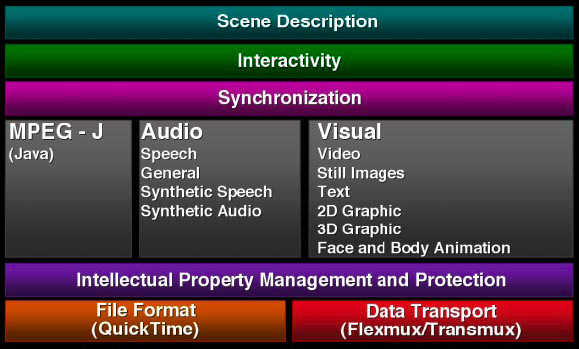
    Video files are packaged in specialized containers containing header data and video content encoded in what could be multiple different codecs per container type. The drawing above is an example of the multiple components of MPEG-4 from descriptive elements to the audio and video tracks, and the synchronization to bring it all together. Information such as title, description, author and copyright are common and similar to an MP3's ID3 information. Additional data such as encoding format, frame rate, duration, height and width, and language may be included.

    Descriptors such as MPEG-7 can be applied to the entire file, or applied to just the audio or video track. A publisher may also describe a sub-section of a video with more information, such as a nightly news report containing descriptors for each individual segment.

    The Library of Congress maintains a directory on video formats aimed at preserving digital moving images and their descriptions throughout time. It's an interesting browse if you're into that sort of thing.

    Subtitles

    A video may contain timed text, otherwise known as subtitles. This information can be described using 3GPP Timed Text, for hearing impaired, language translation, karaoke, or many other uses. Search engines may use this data to easily gather more information about the track.

    Hosted video

    File size and bandwidth constraints of individual web hosts make specialized video hosting an attractive (and often free) option. Google will host your video files on Google Video or YouTube, Yahoo! hosts video at Yahoo! Video, and Microsoft has MSN Soapbox. Hosted video standardizes video formats for easy playback, extracts metadata at the time of upload, and collects ranking data such as popularity and derivative works through its user communities.

    Video hosting handles many of the current limitations of video sharing. Encoding is normalized and optimized with little noticeable difference to the casual user. Flash Video is a common hosted playback method thanks to the ubiquity of Adobe's Flash player, but hosts will use higher-quality video where appropriate such as Windows Video on MSN Soapbox or DivX on Stage6.

    A hosted video contains its own web page with additional captured (and public) data such as author, page views, category, tags, ratings, and comments. Ratings and other commentary is especially interesting because it allows a site to construct a social network around a particular publisher, learning about their likes and dislikes.

    Watching the movie

    Stumptown Coffee Roasters drink menu

    A movie is a series of still frames in sequence. A sampling of frames reveals context, such as recognizing the actors in a particular scene, the backdrop, or when that Coke bottle appeared during a television show. Image analysis outlined in my image search post can be applied to videos and used to better determine context combined with other available information such as audio.

    Parsing spoken word

    Video indexers can listen to the audio track and parse the spoken word in much the same way as stand-alone audio search. The presence of images provides additional context than pure audio and provides an extended yet focused vocabulary for comparison. Matching your pronunciation of "cappuccino" to the visual cues and sounds of a cafe assist in speech recognition. Similarly, the presence of a football on screen provides better context for the word "goal" during your family's weekend match.

    Tracking video citations

    Fingerprinting

    Professional videos are often "fingerprinted" with information about the work. A video producer might include frames that are ignored by humans viewing 24-60 frames per second, but identifiable by machines watching for the data.

    Television shows often have frames of text at their beginning to communicate the show title, episode number, year produced, and other data. Special frames may be used before and after a commercial to easily denote a switch from syndicated content to locally inserted media. Techniques from professional video production may find their way into more web videos, especially as amateurs begin using tools previously only within the reach of the pros.

    It is also possible to fingerprint a file based on its description data, length, and other factors. A video site could "roll up" these different references and track the original source by discovery date or direct reference where available.

    As videos are copied and redistributed their digital fingerprint will often remain intact, allowing indexers to recognize and attribute the piece to its original source.

    Videos within videos

    Videos sometimes contain citations and references to other videos. The nightly news referencing the President's State of the Union address will use a single source of video provided by the U.S. government. References to "education reform" may then be applied and ranked based on these video citations and history of heavy citations of government videos, similar to PageRank and other methods used today for other publicly addressable resources.

    Summary

    Video is a busy space and I feel like I've only scratched the surface with this long post. Expect more companies with expertise in image and audio search to get involved in video search. The image technologies of recent Google acquisition Neven Vision have already been applied to video feeds from security cameras. The audio search technology used by BBN Technologies is now being used by PodZinger to search a video's audio content.

    You can expect to see even more technologies making their way from the security sector into consumer use as we've already see happen in image and audio search. Sequence neutral processing may eventually be applied to the space, replacing the multiple serialized analysis passes we have today.

    Video is booming and is not going away anytime soon. Video capabilities are becoming more common in mobile phones, our capture quality continues to increase, and easy-to-use editing tools on the desktop such as iMovie put better tools in the hands of the average user. Video sharing used to involve recording to a VHS or DVD for sharing with friends but is now as easy as a menu option within an editing application or uploading via a web form on a popular hosting site. The growth of media-hungry sites MySpace and YouTube have proved the built-in audience waiting for new content. The cat videos, karaoke, short films, and breaking news reports will continue to roll in, creating a need for better search and discovery. Hopefully the search industry is up to the challenge and will continue to surface new and relevant information to an eager audience.

  5. May09

    ExpoTV videopinions

    iPod shuffle review on ExpoTV

    ExpoTV is best described as Epinions in video form. Users submit video reviews of products and share tips with others. Creating a review can be as simple as demonstrating a product's features in front of a webcam. I watched video reviews of an iPod shuffle, Proactiv acne solution, and Sharpie highlighters.

    The company was founded by executives from the cable TV industry. ExpoTV content is available on-demand from Comcast, Adelphia, Charter, and a few other big cable companies. ExpoTV makes money by connecting viewers with a product purchase. Videos in certain categories receive an Amazon gift card of $10-$25 per submission and popular contributors have the chance to receive free products from manufacturers.

    A clever new form of user-generated video content! Some of the contributions are obviously from aspiring actors and producers but that's part of the fun.

Niall Kennedy Niall Kennedy is a web technologist in San Francisco, California in the United States. I am very interested in the world of... MORE »

Search this weblog:

Subscribe:

Recently Popular

Archives: Popular Categories

Sites: More from Niall